Tampilkan postingan dengan label picnik. Tampilkan semua postingan

Kamis, 14 Agustus 2008

Edit photos online from Flickr using Picnik

Picnik, as you aware one of the best online photo editing service available for free, can be used to edit your photos directly from your Flickr Albums. You does not require to have any photo editing software on your computer. Only thing you need to have is a web browser with adobe flash player and an active internet connection.


Apart from Flickr you can also edit photos available in your Picasa webalbum, photobucket, freewebs, facebook, myspace etc. Get geared to experience Picnik online photo editing without any registration.

Read the article on Adobe Photoshop Express online.

Senin, 31 Maret 2008

Picnik is now free online photo editing service with advertisements

Picnik one of the front runners in online image editing service gone free. You can edit, convert and share photos online in your web browser with Picnik. Now Picnik team made the service free for users with the help of advertising. With this new step from Picnik team, all the users will have access to Picnik's multitudinous Effects, Frames, Touch-up Tools, Shapes and Fonts. Also there are bunch of themes for specific seasons and celebrations.


And, still there is a scope for those who want to be a privileged user. They have kept aside some extra delicious goodies for our lucky Premium users.

Flauntr is an another similar online photo editing service like Picnik.

Must read: Craft your own Greeting cards with Flauntr online photo editing

Sabtu, 03 November 2007

Add rounded edges for photos online

Picnik, the famous portal for editing photos online has added lots of features, fonts and effects. Among them some features are reserved for premium users.
Still there are lots of new features set aside for free users. Like,
  • Adding border for your photos and
  • Enabling rounded edges for photos.
  • Adding text over the photos.
  • Putting custom shapes and symbols on photos
  • Get photos from with Facebook and Webshots

More over you can also enhance your photos online with Picnik.
But, lot more features will be available for premium users at a cost of $24.95USD a year. [Visit Picnic]

Suggested articles
Edit, convert and share photos online in your web browser with picnik
Create Cool Web 2.0 style buttons online without Photoshop or GIMP.
Web 2.0 Design tips and button styles.
Create buttons online without Photoshop or GIMP.

Kamis, 11 Oktober 2007

Edit, convert and share photos online in your web browser with picnik

picnik provides a very intuitive and easy to use web interface to edit, convert images online.
In order to accomplish online editing of your photos, you need to create an account in picnik.
Once you are done with creating your account in picnik, you are privileged to edit, convert and share your photos online.


picnik allows you to upload and edit photos from different sources
  • You can upload the photo from your computer for editing,
  • You can edit your photos in flickr, picasa web albums, facebook, photobucket by integrating them with picnik.
  • You can edit your photos by fetching directly from a url.
  • You can fetch photos from yahoo and flickr search results.
  • You can also directly get the photos from your WebCam.
The basic photo editing utilities allowed in picnik are
  • Auto-fix of the photos online.
  • Rotating the photos online.
  • Croping your photos online.
  • Resizing the photos online.
  • Changing the exposure of your photos online.
  • Changing the color levels of your photos online.
  • Sharpening your photos online.
  • Also it allows online correction of Red-Eye in the photos
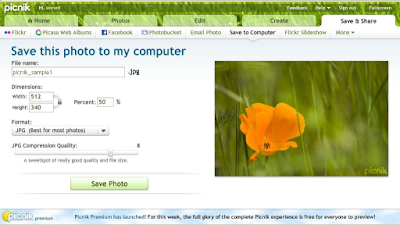
picnik can also be used as an online image converter apart from editing photos.
You can convert your images to .jpg, .png, .gif, .tiff, .bmp and .pdf formats.
Thus this can also be used as online photo to pdf converter.
In order to use picnik, it needs you to have flash player 9 enabled in your web browser.

Enjoy online photo editing in your web browser without Photoshop and Gimp.

Suggested readings
Create Cool Web 2.0 style buttons online without Photoshop or GIMP.
Web 2.0 Design tips and button styles.
Create buttons online without Photoshop or GIMP.