I have installed the Window 7 beta from Microsoft and started dating with the new Windows buddy. Its pretty cool and performing well compared to other Windows versions. In Windows 7, by default if you minimize the multiple applications windows, it will get combined with one taskbar button corresponding to the type of the application window.
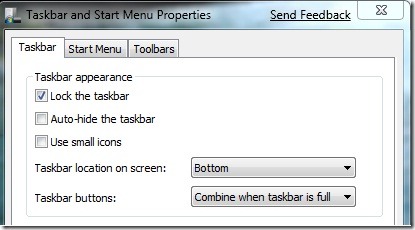
But in Windows Vista and XP, when application windows are minimized it will get combined only when the taskbar is full. You can do the same on Windows 7 also, for more convenience. You need to right click on the taskbar and click "Properties", and select the "Taskbar" tab. Select the drop down menu corresponding to the Taskbar buttons and choose "Combine when taskbar is full". Press OK to apply the changes.
Also read:
Transform Windows XP to Windows 7 for free
Download Windows 7 Theme for your Mobile Phone


