Senin, 22 Oktober 2007

Watch and share tv shows over internet with joost

Joost is new approach in screening TV shows over internet for free. Once you are registered with Joost, you can watch more than 15000 TV shows from more than 250 TV channels for free.


With the help of Joost you can:
  • watch shows in high quality audio and video.
  • Create favorite list of channels
  • Invite your friends to Joost.
  • Chat with friends while you watch Joost.
  • Rate and discuss about TV shows.
  • Make blog entries about, what you are watching.
  • Very easy to use like a regular TV
Its a cool approach for showing free TV, over internet.
Also see how to start and stop Joost play with Windows Media Center Edition.

Download Joost for Windows | Download Mac OSX

Suggested readings
Yahoo! Go™ will change the way you watch TV.

Find travel routes with your mobile and amAze

Amaze is a free GPS navigation software for mobile with integrated map search and route calculation facility. With the help of amAze installed in your mobile, you can find the routes between two places very easily.
Along with route finding feature, amAze has a very good voice enabled guidance facility. This voice enabled guidance facility would help you take turns in the route while traveling.
You can watch the video below, which demonstrates the route finding feature of amAze.


Requirements for amAze GPS mobile navigation software
  • GPS enabled mobile (internal or external)
  • Java Enabled Mobile
See the list of Supported mobile handsets.
Download amAze GPS mobile navigation software for free.

Suggested readings
Find distance between places online with Sanoodi
Nokia Prism series, a real competitor for iPhone
Nokia N800 Internet Tablet - Taking the internet to new places
Apple iPhone Specifications, Features and Screenshots

Rabu, 17 Oktober 2007

Vista aero theme for firefox web browser

Here is nice opportunity for Firefox users to enjoy the theme of Windows Vista, The Vista-aero theme for Firefox. This will give Firefox the most IE7 like look and feel and the Vista progress bar on the Firefox status bar. The menus in Firefox will also will look like those menus in Windows Vista on other Windows Operating Systems. Also you will get IE7 like tabs for browsing in Firefox.


One thing I have observed after shifting to this Vista-aero theme is that I couldn't open new tabs by double clicking on the tabs bar. This is possible in Firefox with default theme and even in IE7, but not in Safari for Windows. I hope the developers would fix this issue with Vista-aero theme in near future. Vista-aero theme for Firefox is one of the must have theme for Firefox users. [Install Vista-aero theme for Firefox ]

The myFirefox theme can be considered as a predecessor of this Vista-aero theme.

Suggested reading
Good collection of firefox wallpapers for desktop and mobile

Senin, 15 Oktober 2007

SecondLife - way to realize your dreams and fantasies virtually

Second Life is a new online digital virtual world created by the people from the real world with their own imaginations.
Second Life is the buzz word in the current online scenario. This digital virtual world is found by Linden Lab. Once you register with SecondLife.com you can download a Second Life Client for interacting with the residents of the virtual world.
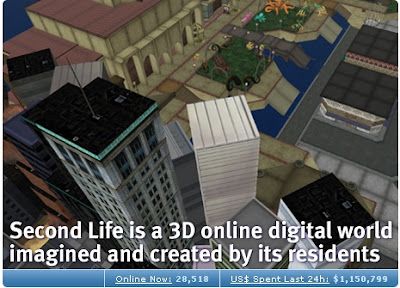

You can do and enjoy most of the real life activities in this Second Life digital virtual world. You can interact with your fellow residence in many ways. You can run your business, enjoy music concerts, chat with people, watch shows and even you can sell and purchase lands. Don't worry about the money exchange issues, the official currency of Second Life is Linden Dollar L$.

You may feel that, this Second Life is a kind of internet enabled multi-player strategy game. But its is some thing more than that, with a real life touch and feelings. And being a resident in Second Life, would help you realize your dreams and fantasy virtually So, if you wanna experience your Second Life, you can join there at: SecondLife.com

Jumat, 12 Oktober 2007

Blogger reports error code bX-ltlqzv while uploading images

Blogger shown a error page as shown below, when I tried to upload one image for my blog post.


In order to post the image, I waited for few minutes and then uploaded the image again by closing the previous image upload window. Then it worked fine. You can also do the same method to upload the images to your blog posts if such an error comes. Happy Blogging.

Free Desktop capturing software to aid remote demonstration, education and tech support

CamStudio is a free video recording software to record your desktop activities. Just invoke this software to capture the desktop screen activities and it will take care of creating the video of your desktop activities depending on your input controls.


This software will find very useful in following situations
  • Demonstrating your software product remotely: When you want to give a demonstration of your software product, you can create a video with CamStudio and circulate in CDs/ DVDs with the concerned people for demonstration. Also you can give a remote demonstration by uploading the software product demonstration video in video sharing web sites like YouTube and circulate the video url with the clients.
  • Creating multimedia tutorials for students: You can make use of CamStudio screen capturing along with audio recording to create multimedia tutorials for educating students ranging from little kids to university graduates. This would aid students learning the subjects step by step, as you can deliver the step by step activities of the subject in your destop along with your own audio explanation.
  • Creating How to Do Videos for customers: CamStudio screen capture with audio recording will also help your circulating videos for solving frequently asked questions about your product or technologies. This would help in reducing the cost of technical support for very common issues and doubts.
  • Promoting your blog and websites: Create a video with CamStudio showing the important and popular pages of your blog or website and upload the video in video sharing portals like YouTube, Google Video, Yahoo Video and MSN Video. By providing the blog or web site address in the video would help attracting more visitors who are watching the videos across the globe.
Download the latest version of CamStudio here.

Suggested readings
Convert images and photos to video with Microsoft Photo Story 3
Edit, convert and share photos online in your web browser with picnik
Turn any spare PC into a second monitor for your main computer
Video Blogging Made easy in Blogger with video direct uploading
Create widgets to share your photos and videos on blogs with Box.net
Do remote presentations and chat conferencing with Google Presentation and Talk Gadget

Kamis, 11 Oktober 2007

Edit, convert and share photos online in your web browser with picnik

picnik provides a very intuitive and easy to use web interface to edit, convert images online.
In order to accomplish online editing of your photos, you need to create an account in picnik.
Once you are done with creating your account in picnik, you are privileged to edit, convert and share your photos online.


picnik allows you to upload and edit photos from different sources
  • You can upload the photo from your computer for editing,
  • You can edit your photos in flickr, picasa web albums, facebook, photobucket by integrating them with picnik.
  • You can edit your photos by fetching directly from a url.
  • You can fetch photos from yahoo and flickr search results.
  • You can also directly get the photos from your WebCam.
The basic photo editing utilities allowed in picnik are
  • Auto-fix of the photos online.
  • Rotating the photos online.
  • Croping your photos online.
  • Resizing the photos online.
  • Changing the exposure of your photos online.
  • Changing the color levels of your photos online.
  • Sharpening your photos online.
  • Also it allows online correction of Red-Eye in the photos

picnik can also be used as an online image converter apart from editing photos.
You can convert your images to .jpg, .png, .gif, .tiff, .bmp and .pdf formats.
Thus this can also be used as online photo to pdf converter.
In order to use picnik, it needs you to have flash player 9 enabled in your web browser.

Enjoy online photo editing in your web browser without Photoshop and Gimp.

Suggested readings
Create Cool Web 2.0 style buttons online without Photoshop or GIMP.
Web 2.0 Design tips and button styles.
Create buttons online without Photoshop or GIMP.